
How to Develop a Telehealth Workflow
How to Develop a Telehealth Workflow
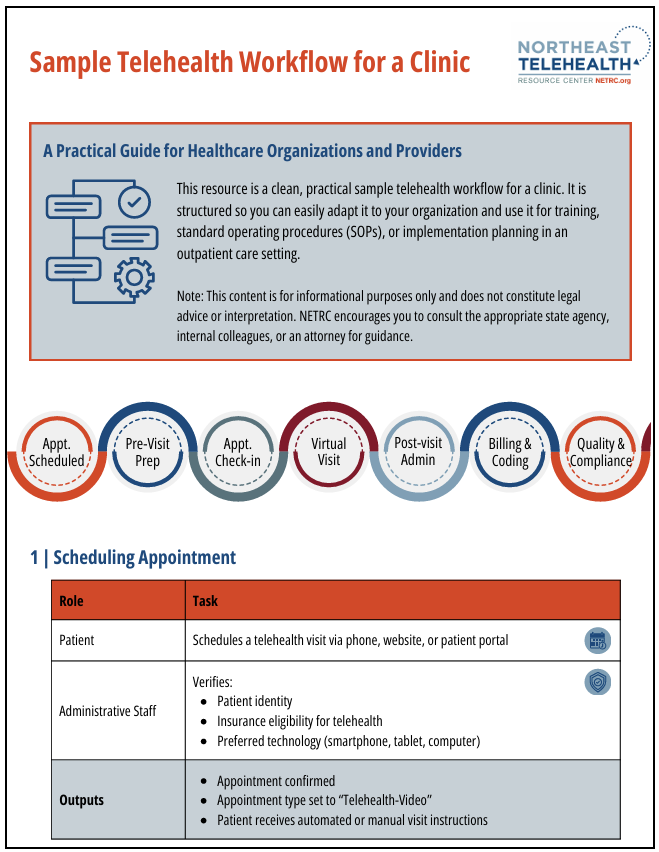
A strong telehealth workflow should mirror your inperson process while optimizing what can be done virtually. Below is a stepbystep structure you can use.
1. Define the Purpose and Scope
Before building anything, get clarity on:
- What services will be delivered virtually?
- Primary care?
- Behavioral health?
- Followups?
- Urgent care triage?
- Chronic disease management?
- Who are the telehealth patients?
- Existing patients only?
- New patients?
- Patient age groups?
- Which staff are involved?
- Providers
- Medical assistants
- Admin team or intake coordinators
- IT support
2. Select and Configure the Telehealth Platform
Identify a platform that meets:
- HIPAA compliance
- Secure video, chat, file transfer
- EMR integration (if available)
- Waiting room features
- Ability to document directly or export notes
Popular tools include:
- Microsoft Teams for Healthcare
- Doxy.me
- Zoom for Healthcare
- Epic telehealth modules
Decide how staff and patients access, authenticate, and receive instructions.
3. Create the Patient Intake Workflow
This mirrors frontdesk operations.
Common steps:
- Appointment scheduling
- Through phone, portal, or self-scheduling.
- Patient eligibility check
- Insurance coverage for telehealth.
- Consent collection
- Previsit econsent form or verbal consent at the start.
- Tech check
- Device readiness
- Internet and camera test
- Instructions emailed or texted to patient
Tip:
Create a standard previsit script and email template.
4. PreVisit Clinical Workflow
This is usually handled by clinical support staff.
Steps might include:
- Virtual checkin by MA or nurse
- Verify identity and consent
- Confirm medications, allergies, health history
- Collect home vitals (if available)
- Update reason for visit
- Add documentation to EMR
You can use:
- Phone call
- Portal questionnaire
- Video previsit room
5. Provider Visit Workflow
This is the actual clinical encounter.
Steps:
- Provider enters virtual room.
- Verify patient identity again.
- Review consent (if not collected earlier).
- Conduct clinical assessment.
- Use teaching tools (screen share, diagrams).
- Determine:
- Treatment
- Followup
- Need for inperson evaluation
Documentation
- Document in EMR like a standard visit
- Note modality used (video/phone)
- Include location of patient and provider (required in some states)
6. PostVisit Workflow
Administrative or clinical wrap-up steps.
Includes:
- Scheduling followup appointments
- Sending prescriptions
- Providing patient education
- Sending aftervisit summary
- Billing and coding (telehealthspecific guidelines)
Pro tip:
Create cheat sheets for appropriate telehealth billing codes.
7. Quality Assurance & Compliance
Build processes that ensure the workflow stays secure, legal, and consistent.
Key actions:
- HIPAA compliance checks
- Telehealth-specific policies and procedures
- Staff training: workflows, etiquette, troubleshooting
- Documentation audits
- Patient satisfaction surveys
8. Build a Visual Workflow Map
Creating a flowchart makes it easy for teams to follow.
Your workflow should show:
Scheduling ⟶ PreVisit ⟶ Visit ⟶ PostVisit ⟶ FollowUp
Most teams use:
- Microsoft Visio
- Lucidchart
- Miro
- PowerPoint flowchart templates
9. Pilot Test and Refine
Run the workflow with a small group:
- A few clinicians
- A handful of patients
- Administrative staff
- IT support
Gather feedback, revise steps, and finalize the workflow for full rollout.
NETRC Developed Resources